Linear Grading
Zangle allows teachers to use linear grading scales. A few adjustments must be made, but mathematically, everything works out! A theoretical analysis of this scale is posted elsewhere and referred to occasionally. This set of instructions is meant to be 'How-To', not 'Why should you'.
Note: If your eyes glaze over in reading all of this, the simplest implementation of this policy is to pick a value for your lowest test score (eg. 50%) and enter that into your gradebook for those who score lower.
Initial gradebook setup
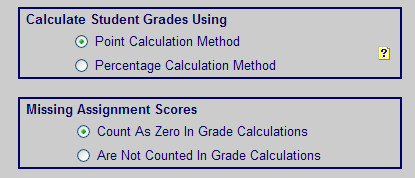
This method works for either Point or Percentage Calculation.
You may count Missing Assignments as either Zero or Not Counted (you will be entering a grade for missing assignments every time, so this setting is not used.)
Gradebook Setup - Class Options Setup
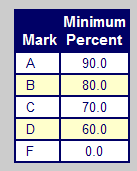
The traditional scale is used. This is NOT where changes are made.
Class Scoring Options
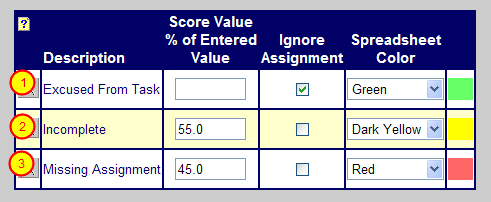
Some teachers enter the missing assignments and 'F' scores themselves - typing in the percentates that they want as the grades. If you do that, you do NOT need these Options. Use them for:
1) Excused from Task - not part of this discussion, but most teachers want it available.
2) Incomplete - This could be used for any 'F' assignment. It is 'incomplete' because it was not satisfactory work (that's the closest term available in the list.) If you do everything on a percent basis, I would skip this and just type in 55% for my lowest 'F'. (Or any other score that you wish to use.) If you have assignments of many different point values, you might wish to do it this way so that the computer does the calculations.
3) Missing Assignment - I would use this so that the progress reports list the assignments as 'Missing'. (see discussion below). Again, you may enter whatever value you wish for your missing assignment score here. If you wish to continue to count missing work as 0% and only adjust Test grades, enter 0% and continue as before. (And you can skip the next three steps.)
How to enter grades: Missing Work

Three examples of how to enter missing work:
1) Figure out on your own, how much you wish to count the missing work. Mathematically, this works out, but it does not show up in the Progress Report as missing.
2) Enter '0' for missing work. Note that this is calculated as '0' and leads to the lower average as discussed in the Theoretical Analysis.
3) Select Missing Assignment in the Grade by Task or Grade by Student when entering grades. Note that you MUST enter the total number of points possible for the student's grade. (You can use the Fill Down option when entering grades if you wish.) Zangle will then take the percentage that you entered for missing work and apply it correctly (see the overall grade for (3) is the same as for (1). The Red indicates that it is missing. This is what I would do.
Progress Report, showing Missing Work (part A)
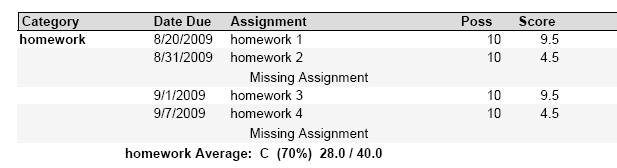
Note that for homework assignments 2 and 4, the report shows a grade of 45% and calls it 'Missing Assignment'
Progress Report, showing Missing Work (part B)

Unfortunately, Zangle does not list these Missing Assignment under Missing Scores at the bottom of the report. Maybe we can have this included in a future implementation of Zangle.
How to Enter Grades: 'F' work

Three examples of how to enter 'F' work:
1) Enter the score earned. It is calculated as entered - overall grade is 58%. (See Theoretical Analysis)
2) Select Incomplete in the Grade by Task or Grade by Student when entering grades. Note that you MUST enter the total number of points possible for the student's grade. (You can use the Fill Down option when entering grades if you wish.) Zangle will then take the percentage that you entered for Incomplete work and apply it correctly (see the overall grade for (2) is the same as for (3). The Yellow indicates that it is missing.
3) Enter whatever you have chosen as your baseline 'F' score yourself. I would do it this way.
Progress Report showing 'F' work

If you choose to flag the assignment as 'Incomplete', it will show up with that label in the progress report, as well as the calculated value of the grade.
Return up one level
Link to the Theoretical Analysis
Back up one level